Trusted by 1,000+ users

Stop swiping Reels Shorts TikTok
Start watching smarter.

Auto scroll YouTube Shorts, TikTok, Instagram & Facebook Reels with Picture‑in‑Picture, speed control, break reminders, and usage stats.

Add to Chrome — It's Free

Works on

YouTube Shorts icon YouTube Shorts
TikTok icon TikTok
Instagram Reels icon Instagram Reels
Facebook Reels icon Facebook Reels

All‑in‑one reels toolkit

Built for multitasking, healthier viewing, and better control across every short-video platform.

Smart Auto‑Scroll

Automatically advances to the next video when the current one ends — no swiping required.

📊

Usage Statistics

Track daily and total scrolls by platform and export your data to CSV to keep habits in check.

🎛️

Per‑Platform Controls

Independent toggles for each platform — customize auto‑scroll settings per site.

⌨️

Custom Shortcuts

Control video playback and navigation with fully customizable keyboard shortcuts.

👑 Premium
📺

Floating PiP Player

Watch auto‑scroll inside a Picture‑in‑Picture window that stays on top while you work or browse.

👑 Premium
🚀

Video Speed Control

Speed up or slow down videos from 0.5× to 2× for faster learning or better review.

👑 Premium

Break Timer & Wellness

Set a focus limit and pause reels when it's time to take a break. Protect your screen time.

🔑

License Management

Activate, deactivate, and seamlessly transfer your premium subscription key across devices.

Up & Running in less than 10 Seconds

Install, open your platform, and start scrolling hands-free. No setup wizards, no accounts.

1

Add to Chrome

Install the extension from the Chrome Web Store in one click. Works on Mac, Windows & Linux.

2

Open Your Platform

Navigate to YouTube Shorts, TikTok, Instagram Reels, or Facebook Reels as usual.

3

Enable Auto-Scroll

Click the extension icon and toggle on your desired platform. The scroll starts immediately.

4

Customize Your Flow

Adjust speed, set break reminders, enable PiP mode — all from the clean settings panel.

Every Panel, Explained

A clean popup UI designed for fast toggles, deep customization, and smarter viewing.

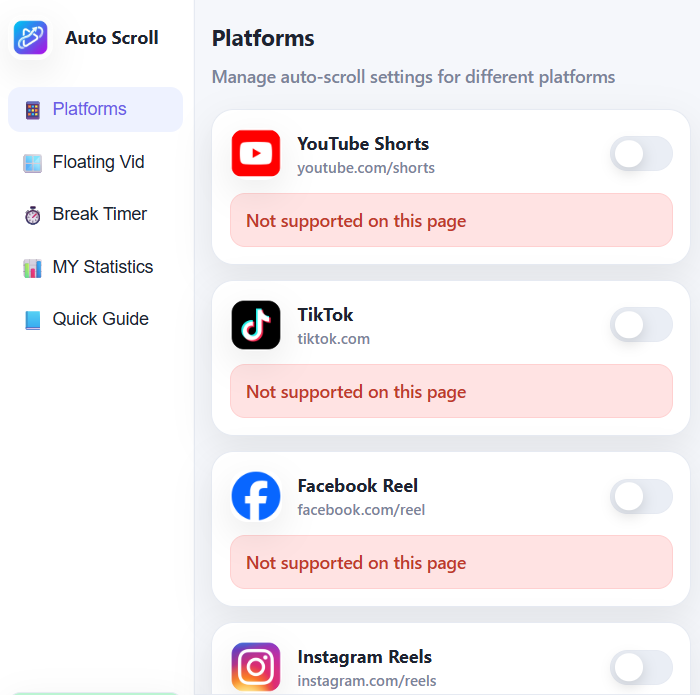
Platform Controls

Enable or disable auto-scroll per platform independently. Each platform has its own toggle so you stay in control of exactly where the extension runs.

  • Independent toggle per platform
  • Instant enable/disable — no page reload
  • YouTube Shorts, TikTok, Facebook & Instagram
  • Platform-specific scroll timing
Platforms settings screenshot

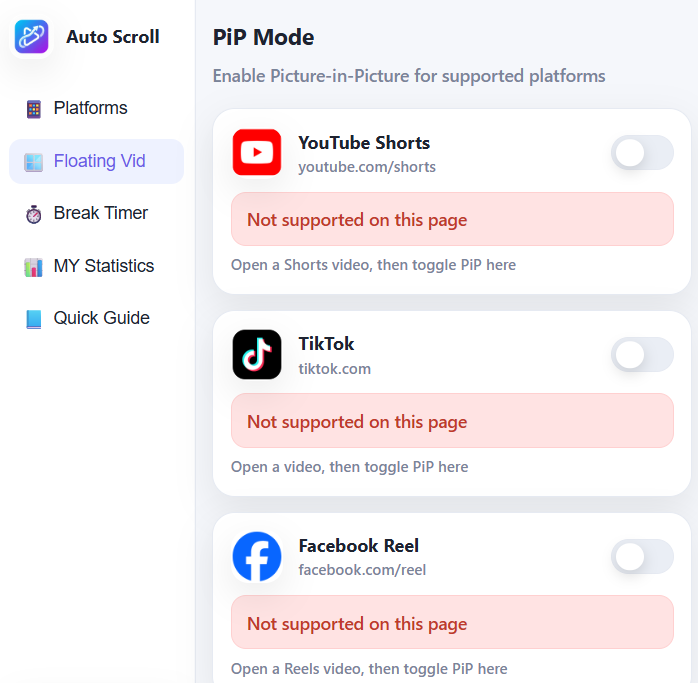
Picture-in-Picture Mode

Pop videos out into a floating window and keep scrolling in the background. Works across all supported platforms — including auto-advance inside PiP.

  • Floating video stays on top
  • Auto-scrolls inside the PiP window
  • Works while browsing other sites
  • Resize and reposition freely
PiP mode screenshot

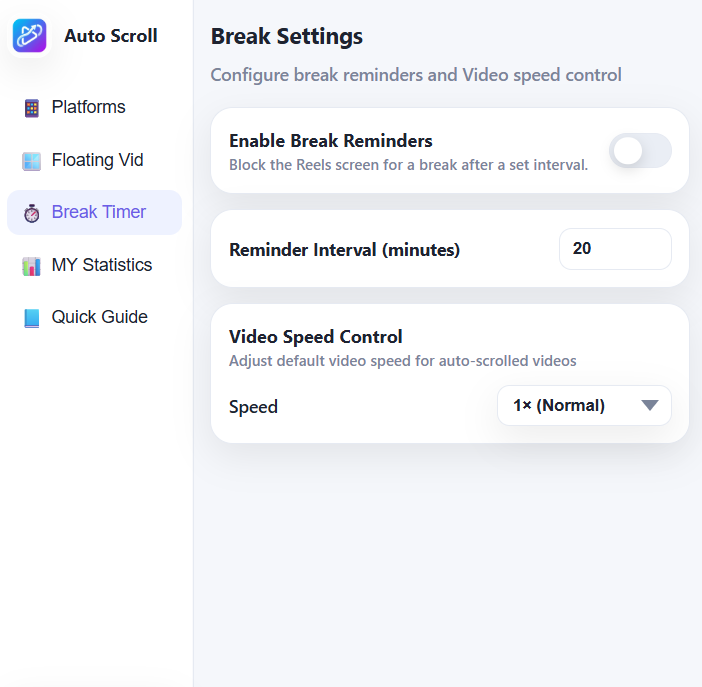
Break Reminders + Speed

Protect your eyes and your focus. Set a reminder interval in minutes and the extension blocks the feed until you're ready to continue. Pair with speed controls for your ideal viewing pace.

  • Custom interval (e.g. 20 minutes)
  • Blocks the Reels screen for a full pause
  • Speed control: 0.5× to 2× default
  • FAQ-friendly break prompts
Break timer screenshot

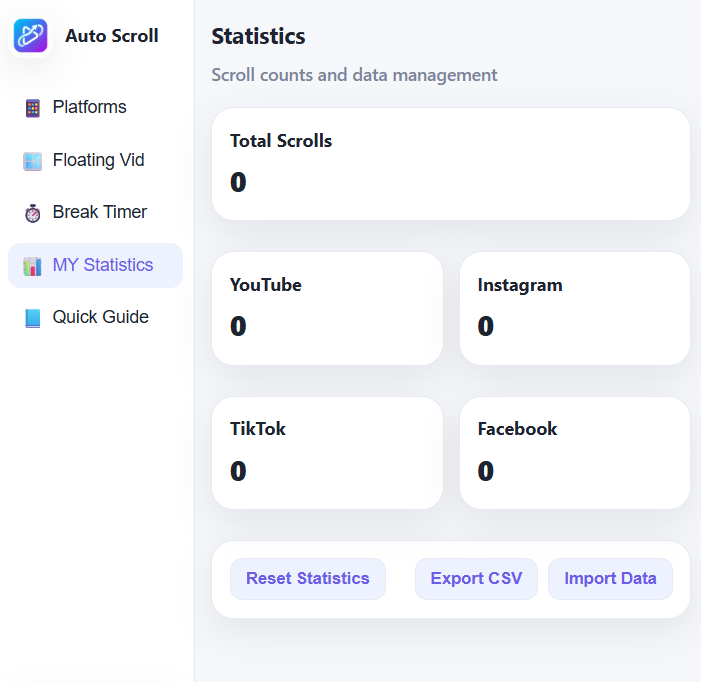
Usage Statistics

See exactly how many videos you've auto-scrolled across every platform. Use the data to reflect on your habits and make intentional changes.

  • Total scrolls across all platforms
  • Per-platform breakdown
  • Export stats as CSV
  • Import & reset options built-in
Statistics screenshot

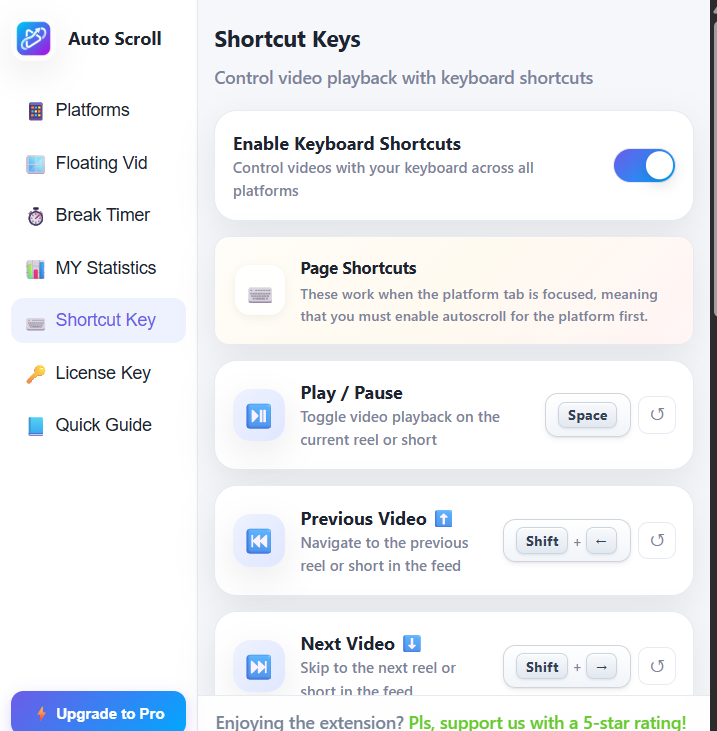
Keyboard Shortcuts

Control video playback entirely with your keyboard. Set up custom key bindings for play/pause and navigating back and forth in your feed.

  • Customize Play/Pause keys
  • Next/Previous video navigation
  • Global layout without focus issues
  • Easy 'Reset to Default' option
Keyboard shortcuts screenshot

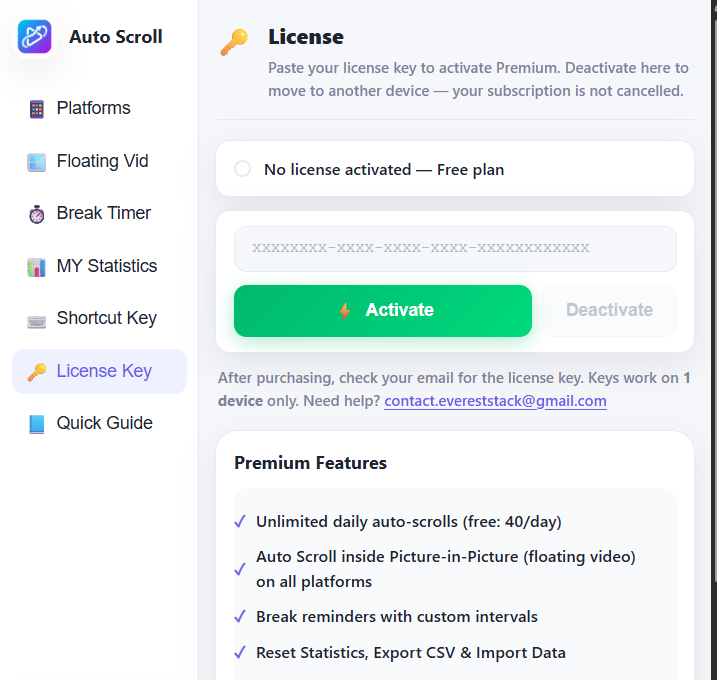
License Management

Instantly unlock your premium features by pasting your license key. Built with ultimate flexibility in mind, ensuring you have full control over your subscription.

  • Instant one-click activation
  • Easy deactivation to switch devices
  • Real-time subscription status checks
  • Secure verification via Dodo Payments
License management screenshot

What is Auto Scroll for Reels & Shorts?

Auto Scroll is a free Chrome extension that automatically advances to the next short-form video when the current one finishes playing. Instead of manually swiping or clicking through YouTube Shorts, TikTok, Instagram Reels, and Facebook Reels, the extension detects when a video ends and instantly scrolls to the next one — completely hands-free.

The extension is designed for passive viewing sessions: cooking, exercising, commuting on desktop, or simply relaxing without touching your keyboard. It works by monitoring video playback state and triggering a native scroll event when the current clip reaches its end, so the platform's own algorithm continues to serve you content.

A standout feature is Picture-in-Picture (PiP) with auto-scroll. Premium users can pop any short-form video into a floating window that stays on top of all other windows — and auto-scroll continues to work inside PiP. This means you can watch TikToks, YouTube Shorts, Instagram Reels, or Facebook Reels in a resizable floating player while browsing other sites, working, or studying. The videos keep advancing automatically without you ever needing to switch tabs.

Auto Scroll also includes a break reminder and anti-doomscrolling system. Set a custom interval (e.g. 15 or 20 minutes) and the extension blocks the feed when time is up, prompting you to take a break. This protects your screen time and mental health while still letting you enjoy short-form content on your own terms. It’s the only auto-scroll extension with a built-in digital wellness feature.

Auto Scroll includes both a free tier (40 auto-scrolls per day across all four platforms) and a Premium tier with unlimited scrolling, PiP mode with auto-advance, video speed control (0.5×–2×), break reminders, and custom scroll intervals. All user data is stored locally in the browser — no accounts, no tracking, no data collection.

How to Auto Scroll YouTube Shorts

Setting up auto scroll for YouTube Shorts takes less than 10 seconds. Follow these steps to start hands-free viewing:

  1. Install the extension — Visit the Chrome Web Store listing and click "Add to Chrome". The extension installs in one click and works on Chrome, Edge, Brave, and any Chromium-based browser on Windows, macOS, and Linux.
  2. Open YouTube Shorts — Navigate to youtube.com/shorts in your browser. The extension automatically detects when you are on a supported short-form video page.
  3. Enable Auto Scroll — Click the Auto Scroll extension icon in your browser toolbar. Toggle on the YouTube Shorts switch. The extension begins monitoring video playback immediately.
  4. Watch hands-free — When the current Short finishes playing, the extension automatically scrolls to the next video. No swiping, no clicking, no touching your keyboard. The scroll happens instantly and seamlessly.
  5. Customize your experience — Open the extension settings to adjust scroll timing, enable Picture-in-Picture mode for multitasking, set playback speed controls, or configure break reminders to protect your screen time.

The same steps apply to TikTok, Instagram Reels, and Facebook Reels — each platform has its own independent toggle so you control exactly where auto scroll runs.

Auto Scroll vs Manual Swiping

Here's how the Auto Scroll extension compares to the default manual swiping experience on short-form video platforms:

Feature Manual Swiping Auto Scroll Extension
Hands-free viewing ❌ Requires swiping after each video ✅ Scrolls automatically when video ends
Picture-in-Picture ❌ Not available natively ✅ Watch in floating window while browsing
Speed control ❌ Limited or unavailable on Shorts/Reels ✅ 0.5× to 2× speed on all platforms
Break reminders ❌ No built-in digital wellness tools ✅ Configurable break timer blocks the feed
Usage tracking ❌ No visibility into scroll habits ✅ Per-platform scroll statistics with CSV export
Cross-platform ⚠️ Each app has different UX ✅ Same controls for YouTube, TikTok, Instagram, Facebook
Privacy ⚠️ Platform tracks all interactions ✅ Zero data collection — all local storage
Auto-scroll inside PiP ❌ Not possible natively ✅ Videos auto-advance inside the floating PiP window
Anti-doomscrolling ❌ No screen time protection ✅ Customizable break timer blocks the feed when time is up

Auto Scroll transforms passive viewing from a repetitive manual task into a seamless, customizable experience — especially useful during cooking, workouts, or when using your computer for other tasks simultaneously.

Simple, transparent pricing

Start free. Upgrade for the full experience. Cancel anytime.

Free
$0 / forever

  • 40 Auto Scroll per day
  • YouTube, TikTok, Facebook and Instagram
  • Usage statistics
  • Custom keyboard shortcuts
  • Ongoing updates & development
  • Priority Support
  • Autoscroll inside Picture-in-Picture
    across all platforms
  • Video Speed Control
  • Break Timer
  • Custom scroll intervals
Add to Chrome — Free
🔒 Secure checkout
🌍 150+ countries, 80+ currencies
📧 License key delivered instantly by email
🔁 Cancel anytime, no questions asked
💳 Card, Apple Pay, Google Pay & more

Common questions

Which platforms are supported?

Auto Scroll supports on the platforms like YouTube Shorts, TikTok, Instagram Reels, and Facebook Reels.

Is Auto Scroll free to use?

Yes. The free tier includes 40 auto-scrolls per day across all supported platforms, plus usage statistics and custom keyboard shortcuts. Premium unlocks unlimited scrolling, Picture-in-Picture mode, video speed control, break reminders, and custom scroll intervals.

What browsers are supported?

Auto Scroll works on all Chromium-based browsers including Google Chrome, Microsoft Edge, Brave, Opera, and Vivaldi. It runs on Windows, macOS, and Linux.

Does auto scroll work inside Picture-in-Picture mode?

Yes. Premium users can pop videos out into a floating PiP window that stays on top of all other windows, and auto scroll continues to advance videos inside the floating player. You can browse other sites, work, or study while short-form videos auto-play and auto-advance in the PiP window — no tab switching needed.

How do break reminders help with doomscrolling?

The break reminder is an anti-doomscrolling feature. Set a custom interval (e.g. 15 or 20 minutes) and the extension blocks the Reels or Shorts feed when time is up, prompting you to take a break. This protects your screen time and mental health while still letting you enjoy content on your own terms. It works on all four supported platforms.

How do I activate my license key?

After payment, Dodo Payments emails your license key. Open the extension → click the Settings icon → paste the key → click Activate. Premium features unlock immediately.

Can I use the extension license key on multiple devices?

No — each license key allows up to only 1 simultaneous activations. To move to a new device, open Settings on the old device, click Deactivate, then activate on the new one.

Is my data collected?

No. The extension is privacy-first and stores all settings and usage stats locally on your device. No personal data is sent to our servers. Payment data is handled securely by Dodo Payments.

What if a feature stops working?

Refresh the supported page to re-activate auto scroll detection. If issues persist, contact [email protected].

Can I cancel my subscription?

Yes, at any time — no questions asked. Your premium access continues until the end of the paid period.

What payment methods are accepted?

All major credit/debit cards, Apple Pay, Google Pay, and 30+ local payment methods in 150+ countries.

Ready to watch smarter?

Join 1,000+ users who scroll less and stay focused.

Add to Chrome — Free